
Regularly someone reopens the same argument. XML or JSON or YAML, as if one has to win and the others lose. It usually comes up in a context like data contracts, where a team has to pick a format and defend it.
The framing is wrong. These formats were built for different jobs in different eras, and the more useful question is which one fits the job in front of you. So here is the history, the trade-offs, and where each one still wins, including what changes now that LLMs and agents read and write structured data too.
XML, JSON, and YAML at a glance
These three formats are different ways to represent structured data. XML is verbose and rigorous. JSON is compact and universal. YAML is readable and config-friendly. None is strictly best. Each won a different era and a different job, and validation became its own layer, led today by JSON Schema.
Key takeaways
- XML led enterprise integration for two decades and now lives mostly in legacy systems, JSON won web APIs, YAML won cloud-native config.
- XML, JSON, and YAML serialize data. JSON Schema and XSD validate it. They are different layers, not competitors.
- YAML has no schema language of its own. It borrows JSON Schema, which is how Kubernetes and similar tools validate YAML.
- JSON Schema now underpins LLM tool calling and structured outputs, which puts it at the center of agentic AI.
- Authored in YAML, validated by a schema, enforced in the pipeline: data contracts are the clearest example of a wider pattern in data governance and orchestration tools.
Serialization vs validation: two different jobs
XML, JSON, and YAML are serialization formats. You author data in them, and a parser reads them back. JSON Schema and XML Schema (XSD) are validation languages. They describe what valid data looks like, and a validator checks a document against that description.
So comparing YAML with JSON Schema is not a fair fight. One is a format you write. The other is a contract you check against. Keep that split in mind. Most of the real story is about how the two layers interact.
A short history of XML, JSON, and YAML
Each format rose with a shift in how we built systems.
XML came first, standardized by the W3C in 1998 with roots in SGML. It became the backbone of enterprise integration. SOAP, WSDL, and the early ESB and SOA stacks all spoke XML. It was verbose but rigorous, and it shipped with a full schema system in XSD. The ecosystem also grew heavy. The sprawling WS-* stack of SOAP extensions became so complex that many engineers came to call it WS-* hell, which is part of why lighter approaches eventually took over.
JSON came out of the JavaScript world in the early 2000s. Douglas Crockford formalized it from JavaScript object literals, and json.org went up in 2002. As REST and AJAX replaced SOAP for web APIs, JSON replaced XML as the default wire format. It was lighter, easier to read, and mapped directly to data structures in most languages. JSON Schema followed later as a separate community effort.
YAML appeared in 2001 as “YAML Ain’t Markup Language,” designed to be human-friendly first. Since version 1.2 in 2009 it is a superset of JSON. It found its home in the cloud-native era. Kubernetes, Terraform, Ansible, CI/CD pipelines, GitOps. Anywhere humans hand-write configuration that lives in Git.
One detail matters for later. Each format handled schema differently. XML built it in with XSD. JSON bolted it on with JSON Schema. YAML never built one and borrowed JSON Schema instead.
Other formats worth knowing: TOML, HCL, Protobuf, and config languages
A comparison limited to three formats would feel a decade out of date. The landscape is wider now.
TOML is simple and serves as the config format for Rust’s Cargo and Python’s Poetry. HCL is HashiCorp’s language for Terraform. In the streaming world, Protobuf and Avro take a schema-first approach and serialize to compact binary, which is why they sit under Kafka and gRPC.
There is also a newer category built to fix YAML’s weaknesses: configuration languages. CUE, Pkl from Apple, and KCL from the CNCF add expressions, validation, and reuse on top of the data model, then render plain YAML or JSON as output. They are not serialization formats. They are programs that generate configuration. For teams drowning in thousands of lines of near-duplicate YAML, they are worth a look.
The rest of this post stays on XML, JSON, and YAML, since they are still the three you choose between most days.
How XML, JSON, and YAML differ in practice
The differences show up the moment you write them by hand.
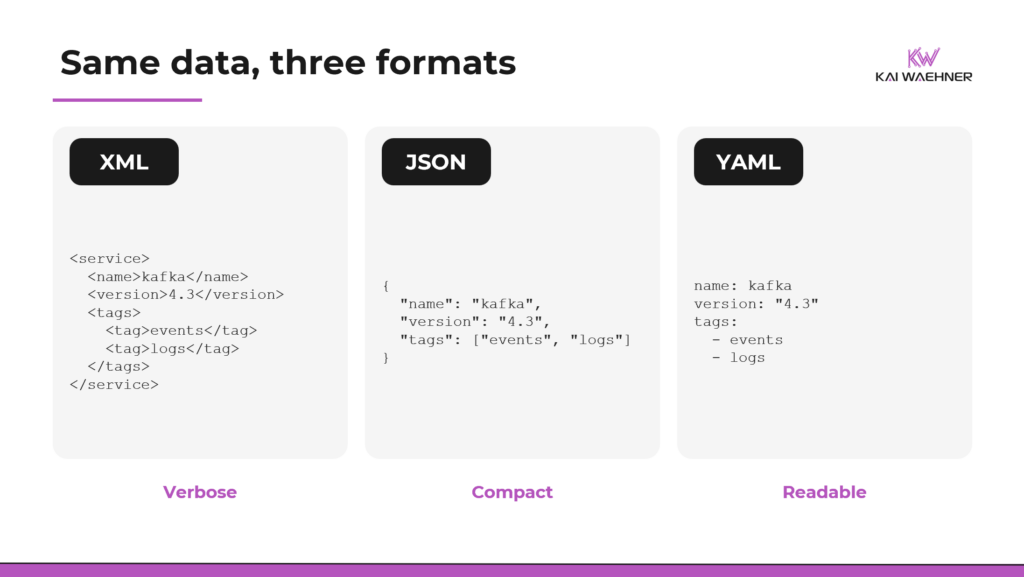
XML wraps everything in opening and closing tags and supports attributes, namespaces, and comments. It is precise and self-describing. It is also heavy. A small payload turns into a wall of angle brackets.
JSON uses braces, brackets, and quoted keys. It is compact and unambiguous, and every major language parses it natively. Its one notable omission is comments. The spec does not allow them, which is a real constraint for anything humans need to annotate.
YAML uses indentation instead of brackets and braces. It supports comments, multi-line strings, anchors for reuse, and multiple documents in one file. It reads closer to how people think about nested data. The cost is that whitespace carries meaning, so structure is easy to break.
Pros and cons of XML, JSON, and YAML
XML’s strength is rigor: namespaces, mature validation with XSD, XPath for querying, and decades of tooling. Its weakness is weight and friction. Few people enjoy writing it by hand, and it feels dated for new web APIs.
JSON’s strength is ubiquity and simplicity. It is the lingua franca of web APIs, it maps cleanly to data structures, and it parses fast everywhere. Its weaknesses are the lack of comments and the absence of native validation in the base spec.
YAML’s strength is readability. It is friendly to engineers and non-engineers, it diffs cleanly in Git, and it supports comments and reuse. The trade-offs come from the same design. Significant whitespace makes it fragile, so one wrong indentation can break the file, and loose typing causes surprises, like the Norway problem where the country code NO once parsed as the boolean false. YAML 1.2 and StrictYAML help, but the tension stays. The same whitespace that makes YAML readable makes it fragile.
One caveat on YAML’s downsides. They mostly bite humans. When tools generate and validate the files, as Kubernetes operators and config languages like CUE or Pkl do, the fragility matters far less. In fact, the sweet spot is machines generating and editing while humans mainly read and review, which plays to YAML’s strengths.
XML vs JSON vs YAML: comparison table
The table below sums up how XML, JSON, and YAML compare across the dimensions that matter most in practice, from readability and verbosity to schema support and failure modes.
| Dimension | XML | JSON | YAML |
|---|---|---|---|
| Human readability | Low | Medium | High |
| Verbosity | High | Medium | Low |
| Comments | Yes | No | Yes |
| Native schema | XSD, built in | JSON Schema, add-on | None, borrows JSON Schema |
| Validation maturity | Very mature | Mature, now dominant | Mature, via JSON Schema |
| IDE tooling | Mature | Mature | Mature |
| Type safety | Strong with XSD | Basic, strong with schema | Weak, coercion surprises |
| Git-diff friendliness | Poor | Good | Excellent |
| Learning curve | Steep | Easy | Easy to start, subtle traps |
| Typical use | SOAP, documents, enterprise | Web APIs, data exchange | Config, contracts, pipelines |
| Main failure mode | Bloat and complexity | No comments, no base validation | Indentation and type coercion |
Does YAML have a schema?
YAML has no schema language of its own. It uses JSON Schema. Because YAML 1.2 maps onto the same data model as JSON, a JSON Schema validator can validate a YAML document without modification. The format you author in and the language that validates it are decoupled, and the decoupling is a feature.
The mechanics are simple. A tool publishes a JSON Schema describing its YAML structure. Your IDE applies that schema as you type, giving autocompletion, inline validation, and error checking. In VS Code this runs through the YAML language server. SchemaStore acts as a public registry of JSON Schemas that editors auto-apply to hundreds of known config files, from Kubernetes manifests to GitHub Actions workflows.
Kubernetes is the largest example. Custom resources validate against OpenAPI structural schemas, which are a JSON Schema dialect generated from the underlying Go types. CI and workflow tools like CircleCI follow the same idea, publishing a JSON Schema for their YAML that editors use for validation and autocompletion. The pattern is consistent. The code is the source of truth, it emits the schema, and the schema validates the YAML.
So XSD was XML’s built-in answer. JSON Schema is JSON’s bolt-on answer. YAML’s answer is to reuse JSON Schema. The result is that JSON Schema became the shared validation layer for both JSON and YAML.
JSON Schema and agentic AI: tool calling, structured outputs, and MCP
Structured data formats used to be a backend concern. Now they sit at the center of how AI systems work, and JSON Schema is the format doing the work.
When an LLM calls a tool, the tool is defined by a JSON Schema. When you ask a model for structured output, you hand it a JSON Schema and the model fills it in. Several providers go further with constrained decoding, which restricts the model token by token so the output cannot violate the schema. OpenAI’s Structured Outputs guarantees schema compliance this way, and Google’s Gemini and others offer similar structured-output modes. The Model Context Protocol (MCP), the emerging standard for connecting models to tools, adopted JSON Schema 2020-12 as its default dialect for tool inputs and outputs in 2025.
The shift underneath is the interesting part. Schemas have always enforced structure, since XSD already validated and rejected SOAP messages at runtime. What is new is where the enforcement sits. The same JSON Schema that validates a config file now also shapes a language model’s output as it generates, token by token. The contract moved from checking data after the fact to steering how it is produced.
Notice the division of labor. Humans author agent and workflow config in YAML, because it is readable. Machines exchange JSON, because it is precise. JSON Schema validates both.
Data contracts and governance: where format choice matters
This is where the choice stops being academic. Data contracts are where formats, schemas, and governance meet.
A data contract is a formal agreement between the team that produces a dataset and the teams that consume it. It defines fields, types, allowed values, freshness, ownership, and quality rules. The shift it represents is governance moving out of documents and into code. A contract in a Confluence page is documentation. A contract in version-controlled YAML, checked in CI/CD, is an enforceable control.
The tooling has converged on YAML for the same reasons that make YAML good for config. The Open Data Contract Standard, at version 3.1.0 under the Linux Foundation’s Bitol project, defines contracts in YAML and ships a JSON Schema so editors can validate them. Soda’s SodaCL expresses data quality checks in YAML and runs them in pipelines, with a cloud layer that adds stakeholder approval. dbt embeds model contracts and tests in YAML. Great Expectations validates against a declarative spec. Different tools, same pattern. Author the contract in YAML, validate it with a schema, enforce it in the pipeline.
The pattern is a familiar one. Databases use schemas to keep bad data out of storage. Streaming platforms use schema registries to keep bad data out of event streams. Analytical datasets now use contracts to do the same thing, one layer up.
Data contracts are the clearest case, but the same model runs through orchestration and governance tooling. Workflow engines like Argo and Kestra define pipelines in YAML that a JSON Schema validates. Policy-as-code tools like Open Policy Agent and Kyverno keep rules in version control and enforce them in CI/CD or at deploy time. Author in YAML, validate with a schema, enforce in the pipeline. The format choice and the validation layer are the same story at every level.
Which format should you use? A quick decision guide
XML fits when you need namespaces, document-centric markup, or integration with SOAP and legacy enterprise systems that already speak it.
JSON is the default for web APIs and machine-to-machine exchange, where precision and universal parsing matter more than human authoring.
Reach for YAML for configuration and contracts that humans write and review in Git, where readability and comments earn their keep.
For validation, reach for JSON Schema in almost every modern case, including for your YAML. Reach for XSD when you are already in the XML world. And when your YAML starts repeating itself across hundreds of files, look at a configuration language like CUE, Pkl, or KCL before the duplication gets worse.
The same logic shows up across the modern data stack. Integration pipelines and APIs move JSON. Process mining still reads XML-based event logs like XES while newer event streams carry JSON. Data contracts and platform config are authored in YAML and validated by JSON Schema. Different layer, different format, same principle.
Stop asking which format is best
XML, JSON, and YAML were never really competing for the same job. XML won enterprise integration for two decades, then its weight and WS-* complexity pushed teams toward lighter options, so today it lives mostly in legacy systems. JSON won the web API era and became the default wire format. YAML won the cloud-native config era. Validation sits on its own layer, XSD for XML and JSON Schema for JSON and YAML, and JSON Schema now also underpins how agents and AI systems exchange structured data.
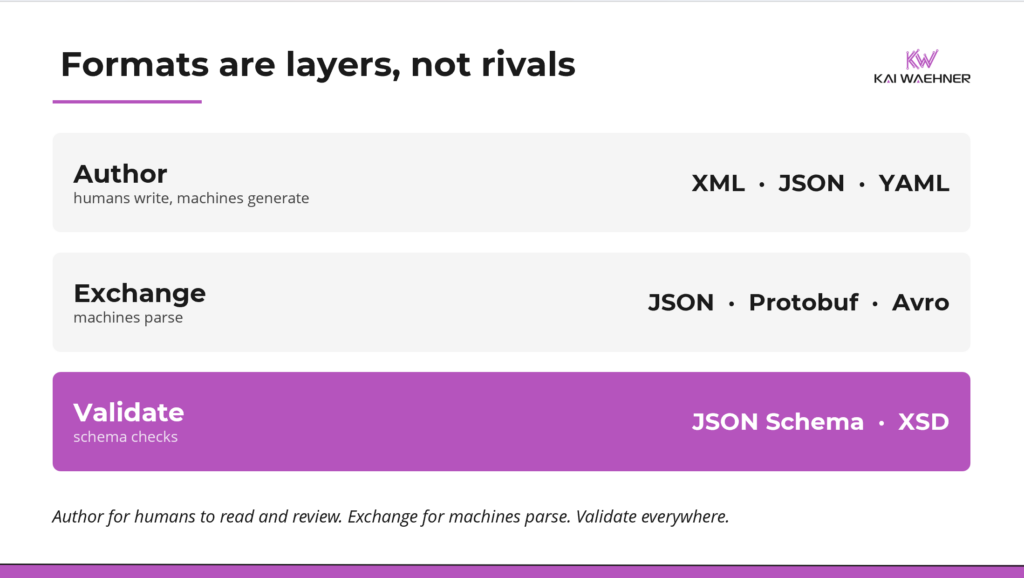
The useful question is not which format is best. It is which layer you are working in. Author where humans read. Exchange where machines parse. Validate everywhere. Get those three right and the format debate mostly takes care of itself.
Stay informed about the latest thinking on enterprise architecture, data integration, process intelligence, and trusted agentic AI by subscribing to my newsletter and following me on LinkedIn or X.