
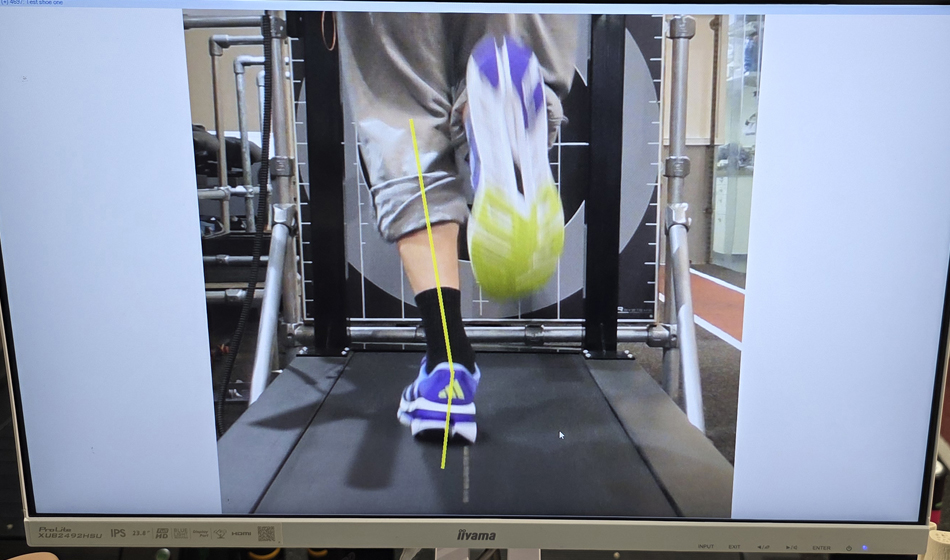
“You’re over-pronating a bit — let’s try you in a stability shoe.”
If you’ve shopped for running shoes, you know the routine: you step on a treadmill and someone films your feet, then comes the diagnosis.
I spoke to Jonathan Hedges of RunRight 3D to explore the myths around gait analysis and how to best use data and science to find your next pair of running shoes.
Whereas it feels scientific and highly personalised, in-store gait analysis can be subjective, with its foundation dating back to the 1980s when manufacturers started producing stability and support shoes. Tools like 2D cameras and pressure mats are outdated and often misleading.
Professor Benno Nigg argues that the Pronation Control paradigm should be abandoned (due to the lack of supporting evidence). This could make sense, as we see similar injury rates as 30 years ago!
Welcome to the gait analysis myth-busting edition. We’ll unpack traditional gait analysis and reveal why cutting-edge, 3D systems are changing the game, delivering faster, smarter, and far more accurate insights into how you run.
MYTH 1: A Rear-View Video Is Enough
That grainy video clip of your heels rolling in or out. It’s only telling one tiny part of the story.
Traditional 2D gait analysis, such as filming your run from behind and slowing it down to explain how your foot pronates, is wildly incomplete. Your feet don’t exist in isolation. Neither does your running form.
Former professional runner and bio-mechanist Dr Emily Carter puts it bluntly: “Rear-foot pronation has been overly blamed for everything from injuries to performance issues, but it’s only one piece in a very complex puzzle.”
Your hips, your knees, your trunk and your cadence all influence how your body interacts with your shoes. A single camera angle simply can’t capture all that detail
MYTH 2: Foot Pressure Plates Can Pick Your Perfect Shoe
Let’s talk about those fancy pressure plates you sometimes see in running stores. You walk or run over them and suddenly you’re looking at a ‘heat map’ of your feet, red hotspots, blue zones, all that. It looks super high-tech and it’s interesting.
But here’s the thing: while they’re great for figuring out where you’re putting the most pressure (which can be helpful for insoles or custom orthotics), they fall way short when it comes to picking the right running shoe.
Think of it this way: ‘Selecting a running shoe from a pressure map is like picking a sports car based on its tyre marks, you see the outcome, not how they were made’.
Pressure plates can’t show how much braking or propulsive forces you generate, or what your knees and hips are doing with each stride. They also cannot calculate how balanced your CoM is during your run. If you’re choosing a shoe to run farther, faster, or pain-free, you need to understand what other parts of your body are doing, not just pressure underfoot. Shoes should support your entire movement, not just the part that hits the ground.”
MYTH 3: One Short Jog Isn’t Enough
You’re asked to hop on a treadmill, jog for 20 seconds, then choose between stability or neutral shoes. Quick, yes, but flawed.
Your gait changes with speed, fatigue and even the shoe itself. You move differently in a warm-up versus a 5km race and the first kilometre looks nothing like the 18th kilometre in a marathon.
Shoe testing should reflect real running conditions, not a brief jog. To truly find the right shoe, warm up in it, then run at your target pace for at least three minutes to let your movement pathway habituate to the shoe you are testing, then analyse.
MYTH 4: Why 3D Foot Scanners Aren’t Enough for Runners
Those sleek 3D foot scanners in running stores are fun; they map your arches, measure your width, and label your foot type. But here’s the problem: they only capture your foot standing still.
Running is ‘dynamic’. Your arches compress, toes splay, knees absorb impact, and hips rotate. None of that shows up on a static scan.
So, while 3D scans are helpful for insoles or general fit, they fall short for picking the right running shoe. Because shoes need to work with your moving foot, not just your resting one.
Real movement needs real-time analysis. Only then can your shoes truly match your stride.
MYTH 5: The Comfort Filter
Is comfort really the best way to choose your running shoes?
If you’ve hung around physios or biomechanics experts, you’ve probably heard of the “Comfort Filter.” Introduced by Prof Benno Nigg in 2015, the idea is simple: the shoes that feel best are the ones your body subconsciously selects to reduce stress, and therefore, injury.
And the science backs it up. Studies show that comfortable shoes improve efficiency, reduce perceived effort, and even lower injury rates when runners choose by feel rather than foot type.
But here’s the catch: comfort is personal, and sometimes misleading. A super-soft shoe may feel great at first but quietly overload your Achilles or knees over time. Newer runners might not yet have the sensory “tuning” to sense those subtle loads.
Some brands have cottoned on to this, and ‘out of the box comfort’ is a real thing.
So while comfort is one of the best starting points, it’s not the whole story. Your shoe needs to feel good and support your biomechanics over miles.
Bottom line: Comfort matters, but comfort with context is what keeps you injury-free.
MYTH 6: AI Pose Systems Can Fully Analyse Your Running Form
We’re into the era of AI, so it’s no surprise that running stores are now using AI-based pose detection. You step in front of a few cameras, take a short jog, and suddenly you’re surrounded by digital lines, angles, and boxes. It’s slick, efficient, and feels like something straight out of the Matrix.
But here’s the catch: most of these systems are still stuck in 2D.
Yes, AI pose tools can measure joint angles, catch asymmetries, and count your reps. But they’re still limited by what a single camera, or at best, two, can capture. That means they’re not seeing the full complexity of how you move, especially when you’re running at real speed, with load, and in three-dimensional space.
Running is a 3D sport. Your pelvis rotates. Your trunk leans. Your knees drift. Your foot lands, rolls, and reacts. It all happens in motion, not just front to back or side to side. A static camera view, even with AI attached, just can’t pick up the full symphony of movement that’s happening, especially when angles shift across planes.
To make things trickier, AI systems often struggle with fast-paced gait, poor lighting, or non-standard body shapes. It’s cool tech, don’t get me wrong. It’s perfect for strength training analysis or quick postural checks. But for running shoes? It doesn’t dig deep enough.
Choosing the right shoe means understanding how your entire body moves, not just how your joints look from one angle. To truly match a shoe to your stride, you need nuanced, 3D motion data, gathered at speed, in context.
Because as runners, we’re not just dots and lines on a screen. We’re kinetic stories in motion. And the tools that help us should be smart enough to see the whole story, not just the flat version.
So, what is the best way to find the right running shoe?
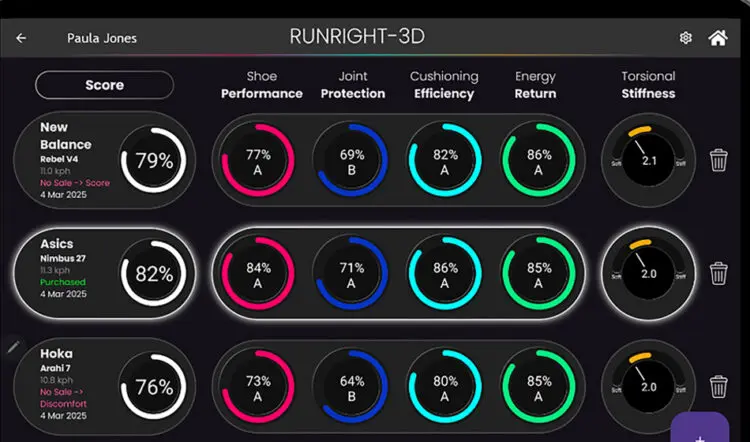
A 3D analysis system that offers detailed insights into your performance in a specific running shoe is unmatched in value. Platforms designed explicitly for footwear evaluation, such as MotionMetrix and RUNRIGHT-3D, analyse your data and highlight critical metrics related to performance, efficiency, and injury prevention.
Each shoe you test is displayed side-by-side within the software, allowing direct comparison of models and facilitating truly data-driven decisions rather than relying on subjective impressions or generic algorithms. The difference is unmistakable: identify which midsole works best for you, which sole shape promotes optimal foot roll, and which shoe enables more efficient braking, far superior to being told, “You’re over-pronating a bit, let’s try you in a stability shoe.”
While these systems are revolutionary, it’s still essential to start with an overview of your current running routines, injury history, shoe choices, and plans. Next, examine your foot shape, arch height, and length to gather enough information to narrow down to three or four pairs of shoes, then exclude those your customer finds uncomfortable (Comfort Filter). Then perform a 3D analysis at your chosen speed, review the data, and select the option that best fits your needs. Nothing compares to the comprehensive insights provided by 3D analysis.
Find out more info at runright-3d