Sports Video clips often fall into an awkward middle ground. Quick social filters are fast but rarely fix real quality issues. Professional software delivers strong results, but it takes time and powerful hardware to run properly. Many teams sit in the middle, looking for better visual quality without slowing down their workflow.
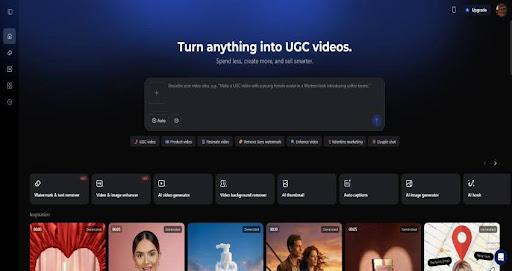
Vmake is a web AI video enhancer that cleans up clips fast for daily work. It does not aim to replace professional editing software. Instead, it fixes blurry faces, static, messy backdrops, and squashed files. This makes it suitable for handling regular production volume.
Vmake Video Enhancer sticks to the simple job to upscale videos to 4K. Many strong sports clips fail because of blurry or grainy visuals rather than weak concepts. Mobile footage, heavily compressed files, or older videos often look soft or distorted. Cleaning that mess usually takes a beefy PC plus years of pro editing skills.
Vmake addresses that gap through automated enhancement features that run entirely in the browser. Files can be uploaded, processed automatically, and returned ready to use.
The platform places emphasis on three areas:
- Resolution improvement for low-quality footage
- Visual cleanup for faces and product shots
- Background isolation suitable for online stores and ads
Busy crews use this for social clips, shop demos, explainers, or recycled files instead of long, heavy movie studio work.

Improving Video Quality Without Manual Editing
The hunt for better resolution is why editors grab these tools. Vmake lets you push clips to 4k using a smart system that scans every frame and fills in the blanks. This works especially well for clips filmed in good light but degraded by compression or repeated exports. Edges look cleaner, text stays readable, and product close-ups appear more polished. Since there are no complex settings to manage, the process stays fast and consistent.
Keeping Faces Clear Without Overprocessing
Faces often suffer most from compression. Vmake applies facial restoration models that focus on eyes, skin texture, and contour clarity. For talking-head videos, this produces a cleaner look without heavy makeup effects.
In most cases, the enhancement feels natural. Skin tones remain consistent, and expressions stay intact. In certain complex scenes with heavy motion or poor lighting, over-smoothing can appear. This is a common limitation with automated enhancement and is worth acknowledging.
Removing and Cleaning Backgrounds
Background removal is another area where Vmake stands out. Instead of relying on green screens or manual masking, the system isolates subjects automatically. This feature works particularly well for:
- Product showcase videos
- E-commerce listings
- Tutorial clips with visual distractions
The edges are clean enough for most commercial use, and background replacement options keep visuals consistent across campaigns.
Vmake runs entirely online, which removes the need for downloads or updates. This design choice affects usability more than most people expect. Files can be uploaded from any device, processed quickly, and exported without managing storage or system compatibility.
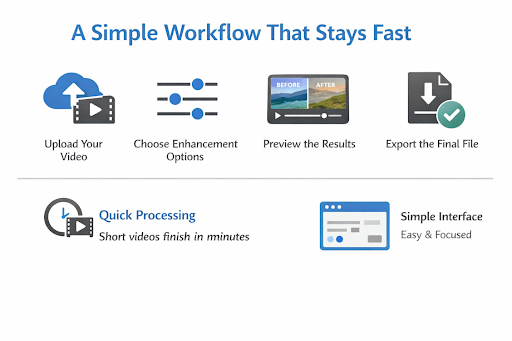
The general workflow follows a simple pattern:
- Upload the video file
- Select enhancement options
- Preview results
- Export the final version
Processing time varies based on file length and resolution, but most short videos finish within minutes. This speed makes it practical for teams producing content daily rather than occasionally.
The interface avoids clutter. Settings are limited to options that matter, reducing decision fatigue. This also means less control compared to professional tools, but that tradeoff aligns with the platform’s goal.
Where Vmake Performs Best
Vmake performs best with common marketing footage. Product shots, presenter videos, and social clips see immediate improvements. Facial enhancement feels balanced, and background isolation holds up well during moderate movement.
The tool also handles batch workflows smoothly. Multiple videos can be processed without significant slowdowns, which matters for campaigns or catalog updates.
Where the Tool Falls Short
No automated enhancer is flawless. Vmake occasionally produces over-smoothed textures in scenes with fast motion, low light, or heavy grain. Hair detail can soften, and fine patterns sometimes lose sharpness.
These artifacts are subtle in most use cases, but editors working on cinematic footage may notice them. For short-form content viewed on mobile devices, the tradeoff is often acceptable.
Vmake lands in a practical price range that makes sense for people producing content regularly but not running a full post-production setup. It costs less than advanced tools like Topaz Video AI, which can deliver impressive results but demand local installation, strong hardware, and time spent learning detailed controls. That level of depth often goes unused outside specialist workflows.
At the same time, Vmake offers more meaningful visual improvement than general design platforms such as Canva.
Why Teams Use Vmake
The real appeal of Vmake comes from how easily it fits into day-to-day production. There is no need to invest in expensive machines or manage software updates. Everything runs in the browser, which keeps the process light and flexible.
Some practical advantages stand out:
- No reliance on high-end hardware or local storage
- Short processing times that keep projects moving
- Tools designed with product videos, ads, and online listings in mind
A Practical Middle Option
For small businesses and marketing teams, this approach makes sense. High-end software often ends up underused, while entry-level apps struggle to deliver clean, usable output. Vmake sits comfortably in between, offering quality improvements that justify the cost without complicating the workflow.
Vmake stands out for its focus on speed and practical output. It does not attempt to compete with professional restoration tools frame by frame. Instead, it delivers reliable improvements with minimal effort.
Topaz Video AI offers deeper control and higher potential quality, but demands powerful hardware and technical knowledge. Canva includes basic enhancement features, yet lacks true restoration models and advanced background handling.
Vmake occupies a space built around efficiency. It delivers results that meet platform standards without requiring editing expertise.
Vmake Video Enhancer succeeds by understanding its role in the content ecosystem. It does not chase perfection or complexity. Instead, it delivers dependable improvements through a fast, browser-based experience.
For marketers and small business teams producing frequent video content, this tool offers a clear efficiency advantage. Visual quality improves without slowing production, and the learning curve stays low.
As a middle-ground solution, Vmake fits comfortably into many production workflows. It bridges the gap between casual filters and demanding professional software, offering quality results that fit real-world workflows rather than idealized editing scenarios.