
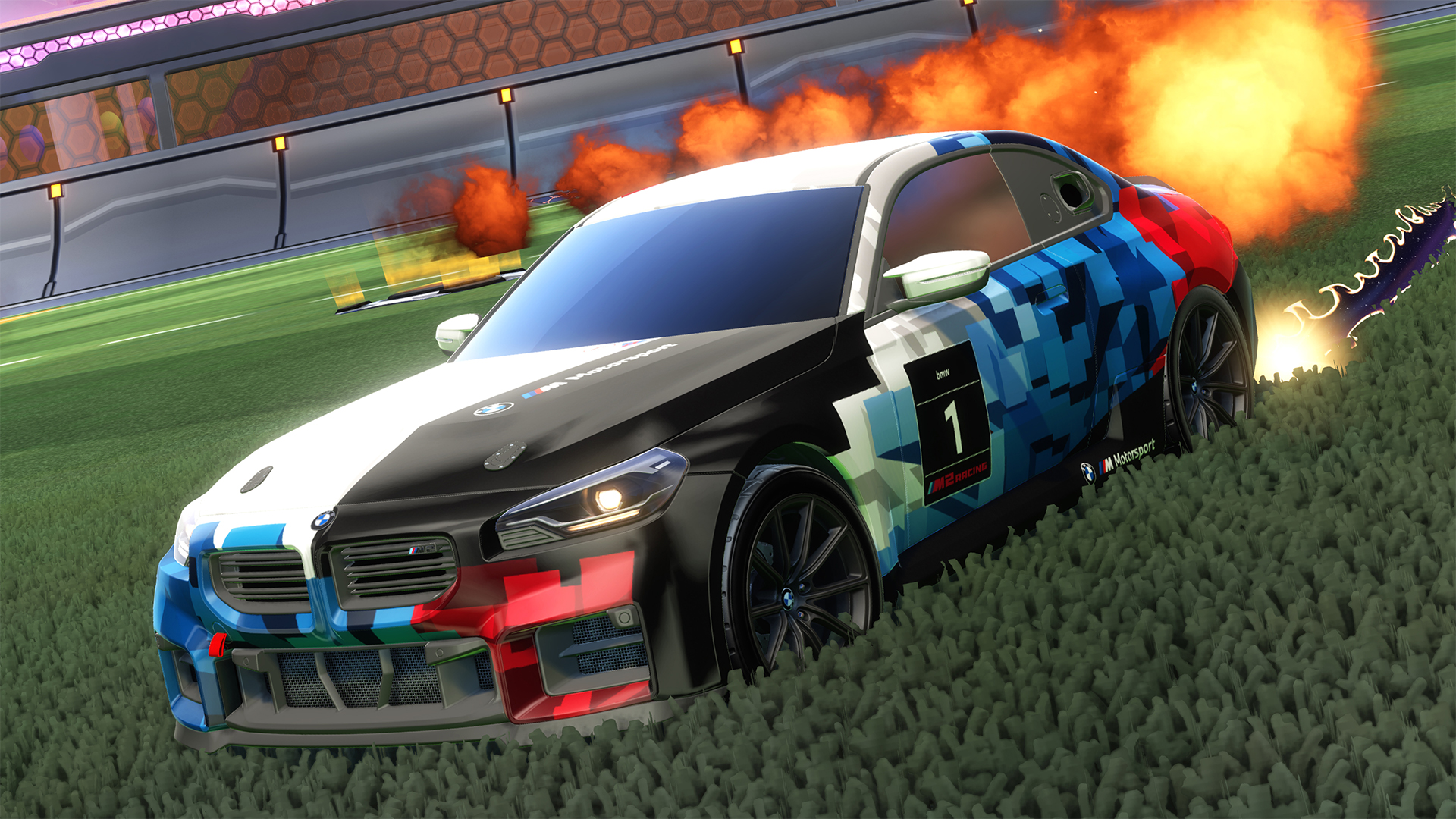
BMW’s entry-level customer racing car headlines the latest Rocket Pass in Season 22.
Rocket League’s latest season update kicks off today (11th March), bringing with it new Rocket Pass vehicles, quality-of-life improvements and a Jordon partnership.
Included in the premium Rocket Pass, players can now drive the BMW M2 Racing in the popular car football game. Available with an assortment of paint jobs and decals, it’s based on the new generation of BMW’s entry-level M2 race car for private customer teams.
Based on the road-going M2, the real-world car produces 313 hp from a 2.0-litre turbo, four-cylinder engine and is fitted with a bespoke exhaust and KW dampers shared with GT3 cars.
Two more cars (the Zefira and Maven) join the M2 Racing in the Rocket Pass, along with Foosball Goal Explosion, Yard Marker Antenna and Checkers Topper accessories and Jordan Brand items.
A new Jordan-themed Limited Time Event is also set to start on 26th March, with details yet to be confirmed.
In addition, the latest update adds several in-game enhancements, including the option to display Matchmaking Ratings in competitive matches, a new audio and visual cue during flip resets and visual recharge indicators on boost pads.
There are also new options in the Custom Training mode to help players hone their skills, such as ball speed, location and size modifiers, along with new bug fixes listed in the patch notes below.
Rocket League Season 22 patch notes
New content, changes and updates
Playlist Population Numbers
Good news, everyone! A really great feature has made its return, and it’s an amazing day to check the queues.
Playlist Population is once again visible in the Play Menu.
- View total Rocket League player population.
- See playlist-specific population when you’re hovering on a mode.
Now you’ll know exactly how packed the pitch is before you queue up.
Flip Reset Indicator
We’ve introduced a new audio and visual cue to signal when a player has achieved a flip reset, which is when the player has regained their dodge by touching the ball with three or more wheels.
- The visual effect is designed as a quick burst to reinforce the moment of reset without disrupting gameplay clarity.
- The flip reset indicator is only visible/audible to the player performing the flip reset or for spectators, but appears for all players during replays, when the option is enabled.
- You can disable the flip reset indicator in the settings.
- Disabling the flip reset indicator also turns off the effect while you spectate.
Visible Matchmaking Rating (MMR)
Players now have the option to choose to display their MMR in Competitive Playlists. Enable this option in the settings to:
- Show your MMR on Competitive Playlist tiles.
- Display MMR on the scoreboard at the end of Ranked Matches.
This setting does not affect Casual Playlists.
Boost Timer Visualisation
Large boost pads now display a visual recharge indicator so you can play more strategically.
- Large boost pads take 10 seconds to respawn, with the visual indicator gradually refilling over those 10 seconds until the pad is fully recharged.
Override Boost Audio Option
Players can now set the default, Standard Boost sound to any Boost they have equipped.
- The Override Boost Audio check box can be found in the Audio tab in the settings.
- Only affects your in-match audio, not replays or menus. Other players will still hear the sound associated with the equipped Boost.
Nintendo Switch DLC Update
If you bought Rocket League DLC on Nintendo Switch or Nintendo Switch 2, you’ll now have it on other platforms that the DLC is available on. Just make sure your platform accounts are connected to your Epic account.
New Quick Chats
We’ve added several new Quick Chats to give players more ways to communicate in-game.
- Informational
- “One more”
- “Back Post”
- “Leaving”
- “Oops, wrong quickchat!”
- Reactions
- “Unlucky”
- “This isn’t Rocket League”
- “Oof”
- “…”
- “Be careful!”
- “Let’s lock in”
- “Brutal!” has replaced “Savage!”
- Apologies
Jump in and let your teammates (and opponents 👀) know exactly what you’re thinking.
Custom Training Settings Update
In Custom Training, new adjustable randomization options create more dynamic scenarios, helping players refine mechanics and build adaptability in unpredictable situations.
These options can be found by opening Custom Training, playing a custom training pack, then opening the settings.
- New settings:
- Ball Speed Modifier (0%–100%, Default: 0%)
- Applies random variance to the ball’s initial speed.
- For example, at 50%, the ball’s speed can randomly increase by up to 50% or decrease by up to 50%.
- Ball Location Modifier (0–1000, Default: 0)
- Randomizes the ball’s spawn location within a radial distance from its original position.
- Ball Height Modifier (0–1000, Default: 0)
- Applies a random vertical offset to the ball’s spawn position.
- Ball may spawn higher or lower within the defined range.
- Vehicle Location Modifier (0–1000, Default: 0)
- Randomizes the vehicle’s spawn location within a radial distance from its original position.
- Vehicle Rotation Modifier (0°–100°, Default: 0°)
- Applies a random rotation variance to the vehicle’s starting orientation.
- For example, if you choose 30°, the vehicle’s forward direction will vary between -30° and +30° from the original setup.
- Applies a random rotation variance to the vehicle’s starting orientation.
- Other new training settings:
- Spawn Vehicle on Ground (Default: On)
- When enabled, the vehicle spawns grounded.
- When disabled, the vehicle spawns using legacy Custom Training behavior (a little bit above the ground).
- Skip Goal Replay
- When enabled, goal replays are skipped during Custom Training.
- •Round Start Input Delay (0–0.1 seconds, Default: 0)
- Changes how immediate a round begins after detecting player input
- 0 seconds allows for faster, more immediate control at the start of each round.
- 0.1 seconds is the legacy Custom Training behavior.
- Spawn Vehicle on Ground (Default: On)
Queue Menu Changes
The menu displayed while searching for a match has been updated to better support players who want to stay in gameplay-focused activities while queued.
- “Freeplay” and “Challenges” now replace “Item Shop” and “Garage” in the Queue Menu. “Training” remains unchanged.
- “Freeplay”
- Instantly loads Freeplay on your last selected map, no confirmation required.
- “Challenges”
- Opens directly to the first tab of the Challenges menu, serving as a quick-access shortcut while queued.
- “Claim” notifications won’t be displayed.
- Opens directly to the first tab of the Challenges menu, serving as a quick-access shortcut while queued.
BUG FIXES
Gameplay
- Removed an unintended piece of wall graffiti in The Block (Hoops) that obscured visibility of the net.
- Fixed an issue where the cage on Beckwith Park Arena’s variants could obstruct the player’s view.
- Fixed an issue that could prevent Custom Tournaments from being created.
- Fixed an issue where the in-match notification feed displayed duplicate messages during a demolition.
- On Nintendo Switch, fixed an issue where the Play Again button would occasionally not appear in the Post-Match Menu after a Competitive match.
- Fixed an issue where a Rumble power-up could be granted too early when using a power-up soon after getting demolished.
Cosmetic
- Fixed an issue where the Magnifique Car Body Trim color would override selected paint colors and finishes.
- Fixed an issue where applying certain Decals caused the rear panel of the McLaren P1 to appear white.
- Fixed an issue where the Deep Space Trail did not consistently appear during goal replays.
- Fixed an issue where the Gravity Bomb Goal Explosion would demolish cars.